One drone. Multiple ground nodes. One stream.


Each ground node adds its own line of sight.
THE PROBLEM
One node has one line of sight.
A single ground station covers the RF bubble its antennas see. A ridge, a building, a treeline, and that coverage ends. Two relays cover both sides and the receiver combines the fragments into one clean stream.
THREE ROLES
One codebase. One config key.
Set the ground-station role to direct, relay, or receiver. The agent enables the right services and disables the wrong ones. No separate firmware.
Default
direct
ground-station receive service
- ✓A single node catches the drone on its own RTL8812EU.
- ✓Serves every pilot-facing client: HDMI, WiFi AP, USB, Android.
- ✓The cloud relay bridge runs here too. No mesh traffic.
Field placed
relay
wfb relay service
- ✓Catches the drone on its own RTL8812EU.
- ✓Forwards raw WFB-ng fragments over the mesh to the receiver.
- ✓Headless. No client services, no HDMI kiosk.
Hub
receiver
wfb receiver service
- ✓Collects fragments from every relay over the mesh carrier.
- ✓Runs WFB-ng Reed-Solomon FEC on the combined stream.
- ✓Serves the clean stream to all clients and advertises mDNS.
SELF-HEALING MESH
batman-adv does the routing.
Every relay and receiver carries a second adapter running an 802.11s mesh on 2.4 GHz, channel 1 by default, clear of the 5 GHz video link. The first adapter catches the drone. The second carries the fragments between nodes.
batman-adv is a Linux kernel mesh routing protocol. Nodes advertise themselves to their neighbors, a dead neighbor drops out in three to five seconds, and the mesh re-routes around it with no operator action. Mesh identifiers are scoped per deployment so two sites on the same channel do not cross-contaminate.
The agent's mesh manager runs the carrier on kernel batman-adv. No custom routing code and no separate firmware. When the role manager sets the role to relay or receiver, it enables the mesh carrier. When the role flips back to direct, it disables it.
CLOUD GATEWAY ELECTION
Any node with an uplink becomes the gateway.
Nodes with Ethernet, a WiFi client link, or a cellular modem advertise themselves as gateways. The receiver watches the mesh quality metric and picks the strongest path, then re-picks on failure.
A relay on a rooftop might have a cellular uplink. A relay in a valley might not. Both advertise themselves as possible gateways. The receiver watches the mesh quality metric and picks the strongest gateway. If the rooftop relay loses signal mid-flight, the receiver switches to the backup gateway in seconds. The cloud bridge stays up.
This is how a distributed deployment stays connected to the cloud relay or a self-hosted MQTT broker without requiring every node to carry its own cellular modem.
RECEIVER PROMOTION
If the hub dies, promote a relay.
Any relay can be promoted to receiver from the Relay mode column in Mission Control's Nodes view, or from the role menu on the node itself. No reboot to change role.
VALIDATED SCENARIOS
Twelve test scenarios.
Distributed receive is feature-complete. Every scenario below has a reproducible test procedure, and field validation on a two-node rig is in progress.
Single-hop relay and receiver over the mesh carrier
Two-relay FEC repair through an obstruction
Two-hop mesh relay routing
Receiver promotion in under ten seconds
Self-healing on a relay drop
Cloud gateway on a relay with a cellular uplink
Gateway failover to a backup node
Partition tolerance and a clean re-merge
Field tap-to-pair with the OLED, no laptop
Three-node field deployment with auto-accept
Decommission and re-pair to a new deployment
Multi-site RF coexistence
COVERAGE MATH
How many nodes do you need.
Coverage depends on antenna gain, terrain, and flight altitude. These numbers are planning guides, not contracts.
| Nominal range | Obstructed | |
|---|---|---|
| 1 node, 2 dBi rubber duck | 1 to 3 km | 0.5 to 1.5 km |
| 1 node, 5 dBi omni | 3 to 8 km | 1.5 to 4 km |
| 1 node, 8 to 12 dBi panel | 10 to 20 km | 5 to 10 km |
| 2 nodes overlapped, 5 dBi each | 12 to 18 km corridor | 6 to 10 km corridor |
| 3 nodes, 5 dBi each | 22 to 25 km corridor | 10 to 15 km corridor |
1 node, 2 dBi rubber duck
1 node, 5 dBi omni
1 node, 8 to 12 dBi panel
2 nodes overlapped, 5 dBi each
3 nodes, 5 dBi each
FIELD TAP-TO-PAIR
No laptop in the field.
A second node joins the mesh from its own screen and buttons. A Curve25519 key exchange runs over the mesh, and the invite bundle is sealed with ChaCha20-Poly1305 under the accept window's join code, so a node that overheard the request cannot answer it.
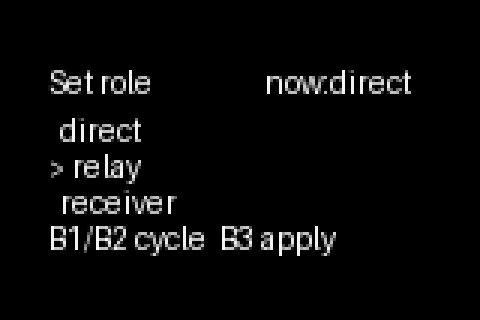
Pick a role.
Each node is set to direct, relay or receiver. The agent swaps services to match, without a reboot.
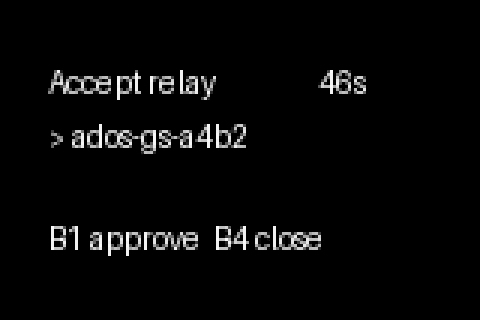
Open the accept window.
The receiver accepts join requests for 60 seconds. Each relay asking to join waits for approval.
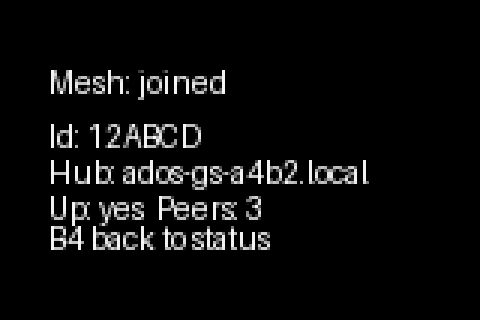
Joined.
The relay holds the mesh id and the receiver it forwards to, and fragments start flowing.
On the receiver, open the accept window. On the incoming relay, pick Join mesh. The relay finds the receiver over mDNS, the key exchange runs, the receiver seals an invite bundle, the relay opens it, and the mesh comes up. The whole two-node flow targets under 120 seconds, with no computer in the field.
Physical UI walkthroughOne mesh. Many nodes. One clean stream.
Full setup walkthroughs, CLI reference, and mesh troubleshooting live in the public docs.
Distributed RX docs